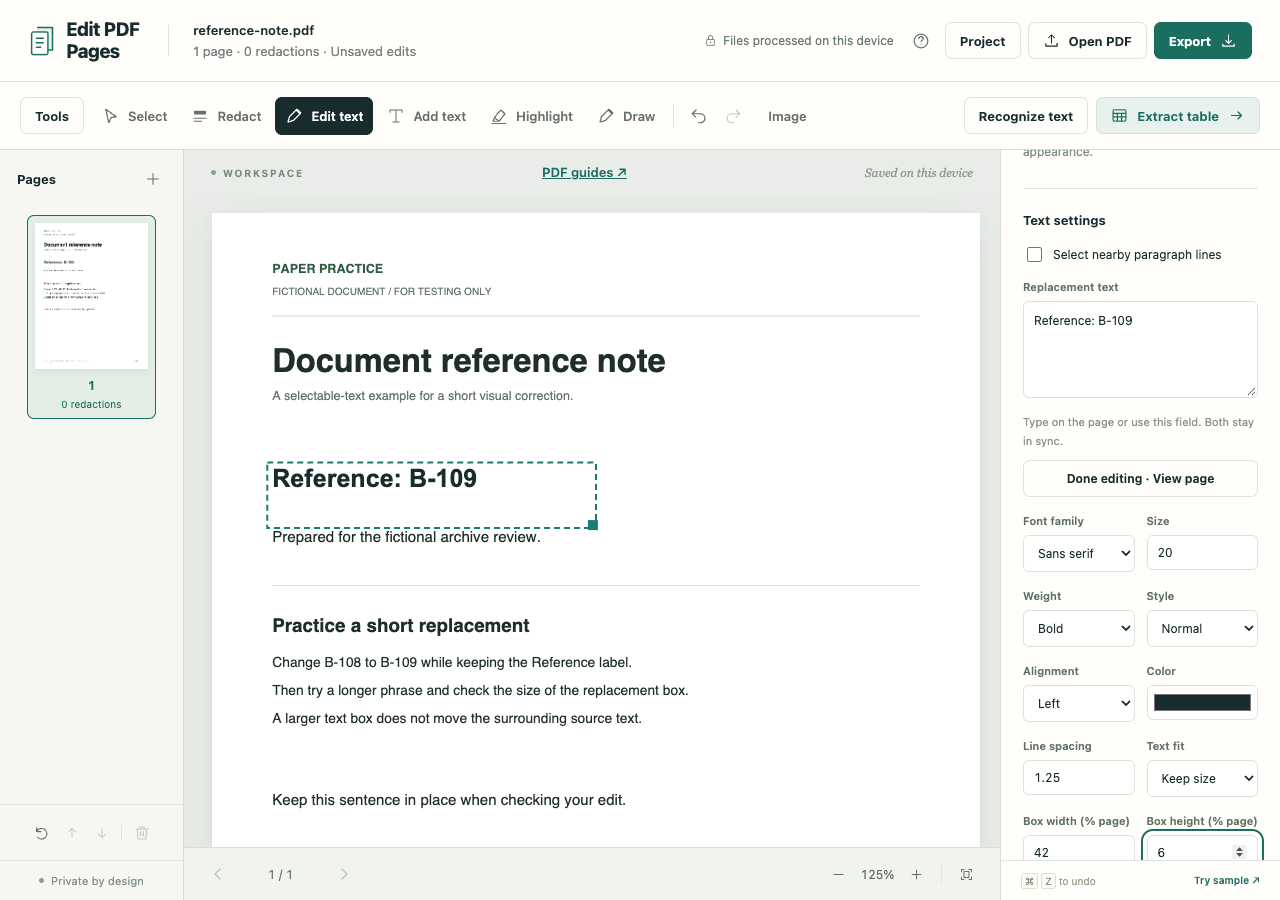
A reference needs changing from B-108 to B-109. Edit PDF Pages can cover the old text and put the correction in its place, but the exported PDF will become image-only. Decide whether that suits your recipient before editing.
This is a visual replacement with approximate fonts. It does not rewrite arbitrary original PDF text objects or move surrounding paragraphs to make room. If the recipient needs selectable text or fillable fields, the export tradeoff may rule out this approach.
Make the short correction
Open the fictional reference note in the PDF workspace.
- Choose Edit text, then click the reference. Check the complete selected text; it may include a label or nearby words you need to keep.
- Type the correction directly on the page. The compact bar controls size, bold and color; the sidebar's Replacement text stays synchronized.
- Choose Done above the page, or press Escape, and inspect the correction at normal reading size.
For a larger passage, enable Select nearby paragraph lines before selecting. Grouping is approximate, so read the selection before overwriting it. If no text can be selected, follow the OCR editing guide. To put a note in empty space, use Add text.
Try a longer replacement
New replacements use Auto-expand box. The box widens as you type, then wraps downward when it reaches the page edge, keeping the font size unchanged. Try a longer phrase to see where it will fit.
To hold the box at a fixed size, choose Keep size under Text fit. Changing Box width (% page) or Box height (% page), or dragging the lower-right corner, also selects Keep size. A long phrase can now trigger an overflow warning and block export.
Enlarge the box, return to Auto-expand box, or choose Shrink to fit. Look at the result after shrinking: clearing the warning is little help if the lettering becomes too small to read.
Check both the new box and the old text area
A wider box can cover neighboring content. Edit PDF Pages offers overlap warnings and smaller-text or manual-resize options, but its text bounds are approximate. Inspect borders, columns and images too; surrounding source content never moves out of the way.
Adjust font family, weight and style for a readable match. The exact embedded source font is not reused. If you move the replacement, its original cover stays anchored over the old wording, so inspect both locations.
Download the corrected copy
Choose Export with PDF selected. The replacement forces Sanitized image-only PDF. Choose the image quality and Create PDF. All exported pages become images, including unchanged pages; source text, OCR layers, interactive forms and links are not retained.
Reopen the PDF and inspect the corrected reference, its cover and neighboring words at normal size and closer up. A .folio project can keep the editable version for another correction, but it retains the original source data. Share the reviewed PDF when the old content must not travel with the file.